ConvertMastery
A comprehensive file conversion and compression web application supporting images, videos, documents, and audio files. Features privacy-first processing, premium features like watermarking and custom file names, and a "My Order" system for saving converted files.
Project Overview
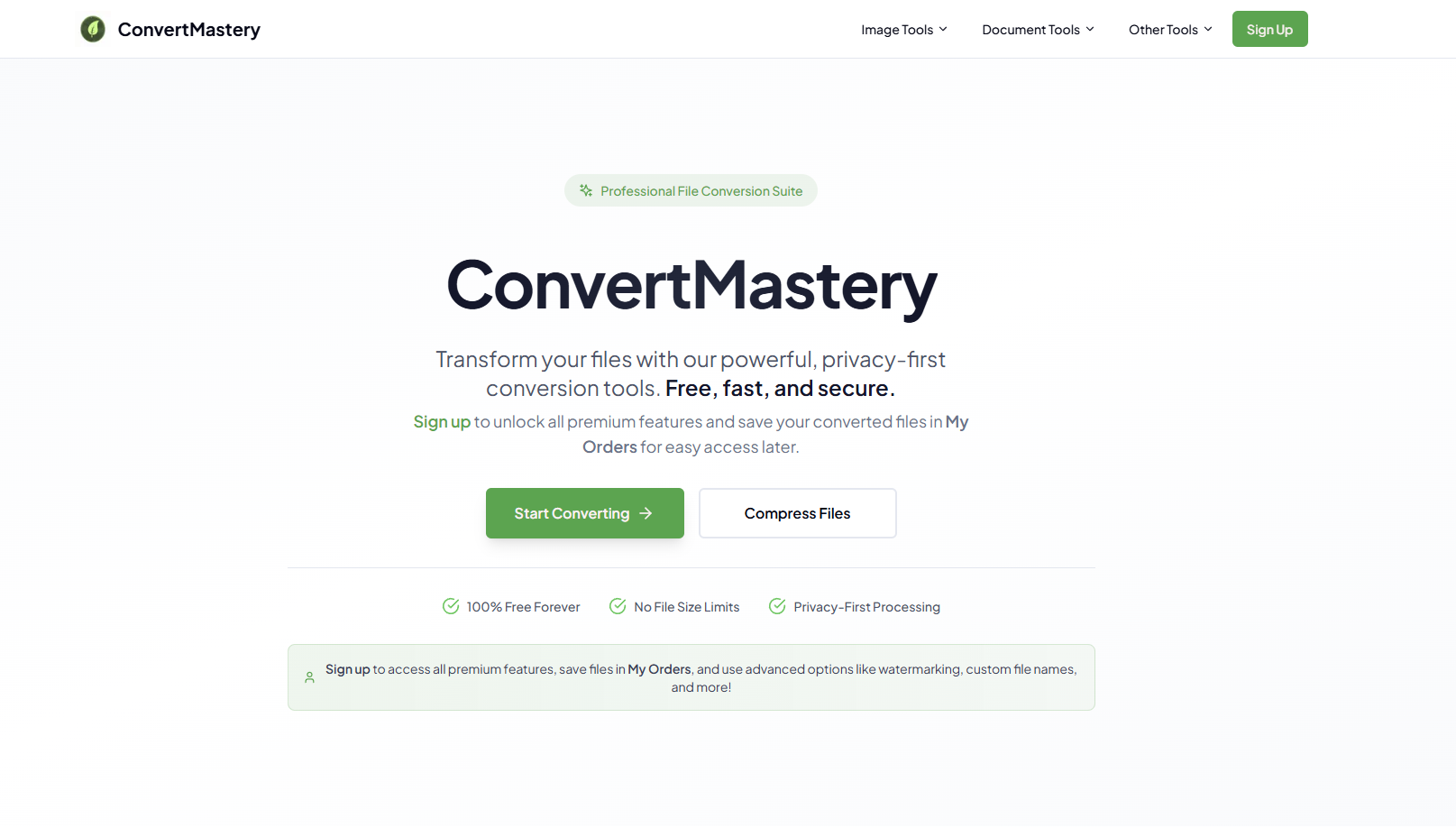
ConvertMastery is a powerful, privacy-first file conversion and compression web application that enables users to convert and compress various file types including images, videos, documents, and audio files. As a frontend developer, I built a modern Next.js application that provides fast, secure file processing with an intuitive user interface. The application offers multiple conversion tools (Image Converter, Image Compressor, Video Converter, Document Tool, Audio Converter) and includes premium features such as watermarking, custom file names, and format presets. Users can sign up for free to unlock premium features and save their converted files in "My Order" for easy access later. The application prioritizes user privacy and security while delivering fast conversion results.
Objective
The primary objective was to create a comprehensive file conversion and compression web application that supports multiple file types (images, videos, documents, audio) with fast, secure processing. The application needed to provide both free and premium features, including advanced options like watermarking, custom file names, and format presets. Key requirements included implementing a "My Order" system for users to save and access their converted files, creating an intuitive user interface for various conversion tools, ensuring privacy-first processing, and building a scalable Next.js application with REST API integration for file processing operations.
Approach
I architected the application using Next.js with server-side rendering for optimal performance and SEO. The application is organized into distinct tool sections (Image Converter, Image Compressor, Video Converter, Document Tool, Audio Converter) each with specialized conversion capabilities. I implemented a file upload system with drag-and-drop functionality and progress tracking. For file processing, I integrated REST API endpoints that handle conversion and compression operations securely. I created a user authentication system that enables free users to access basic features while premium users unlock advanced options. The "My Order" feature stores converted files with metadata, allowing users to access their conversion history. I implemented privacy-first processing by ensuring files are processed securely and not stored longer than necessary. The UI is designed to be intuitive and fast, with clear tool categorization and easy navigation between different conversion options.
Deliverables
Multi-Format File Conversion System
Comprehensive file conversion supporting multiple formats
- Image conversion (JPG, PNG, WEBP, SVG, etc.)
- Video conversion (MP4, AVI, MOV, etc.)
- Document conversion (PDF, DOCX, XLSX, etc.)
- Audio conversion (MP3, WAV, OGG, etc.)
- Format detection and validation
- Batch conversion support
File Compression Tools
Image and file compression with quality control
- Image compression with quality settings
- File size optimization
- Compression ratio selection
- Preview before and after compression
- Batch compression support
- Compression statistics display
Premium Features System
Advanced features for registered users
- Watermarking tool for images and videos
- Custom file naming system
- Format presets for quick conversion
- Priority processing for premium users
- Advanced conversion options
- Unlimited conversion history
My Order System
User file management and history
- Save converted files for later access
- Conversion history tracking
- File organization and categorization
- Quick re-download functionality
- File metadata storage
- Search and filter capabilities
User Authentication & Management
Secure user accounts with free and premium tiers
- User registration and login system
- Free account with basic features
- Premium account with advanced features
- Account settings and profile management
- Usage statistics and limits
- Secure file access control
REST API Integration
Backend API for file processing operations
- File upload and processing endpoints
- Conversion API integration
- Compression API endpoints
- User authentication API
- My Order API endpoints
- Error handling and validation
Privacy-First Processing
Secure, privacy-focused file handling
- Secure file upload and processing
- Temporary file storage with auto-cleanup
- No permanent file storage policy
- Encrypted file transmission
- Privacy-compliant processing
- User data protection
Technical Breakdown
Next.js Application Architecture
Built a production-ready Next.js application with optimized routing, server-side rendering, and efficient file handling.
Implemented Next.js App Router for modern routing structure
Created dedicated pages for each conversion tool
Set up server-side rendering for improved SEO
Implemented API routes for backend communication
Optimized page load times and performance
Configured dynamic metadata for each tool page
Implemented code splitting for optimal bundle sizes
File Upload & Processing System
Developed a robust file upload system with drag-and-drop functionality, file validation, and integration with conversion APIs.
Created drag-and-drop upload interface with progress tracking
Implemented file validation (type, size, format checking)
Set up file preview before conversion
Integrated with conversion API endpoints
Built real-time processing status updates
Created error handling for failed uploads and conversions
Implemented file size limits and format restrictions
Multi-Format Conversion Engine
Implemented conversion capabilities for images, videos, documents, and audio files with format detection and validation.
Created image conversion system (JPG, PNG, WEBP, SVG)
Built video conversion functionality (MP4, AVI, MOV)
Developed document conversion tools (PDF, DOCX, XLSX)
Implemented audio conversion system (MP3, WAV, OGG)
Created format detection and validation logic
Built conversion progress tracking and status updates
Implemented batch conversion for multiple files
File Compression System
Developed compression tools with quality control, preview functionality, and optimization options.
Created image compression with quality settings
Implemented file size optimization algorithms
Built compression ratio selection interface
Developed before/after preview functionality
Created compression statistics display
Implemented batch compression support
Added compression history tracking
Premium Features Implementation
Built advanced features including watermarking, custom file names, and format presets for premium users.
Created watermarking tool for images and videos
Implemented custom file naming system
Built format preset management system
Developed premium user authentication and access control
Created priority processing queue for premium users
Implemented advanced conversion options UI
Built feature gating system for free vs premium users
My Order System
Developed a comprehensive file management system for users to save, organize, and access their converted files.
Created file storage and retrieval system
Implemented conversion history tracking
Built file organization and categorization
Developed quick re-download functionality
Created file metadata storage and management
Implemented search and filter capabilities
Built file management dashboard interface
REST API Integration
Integrated comprehensive REST API endpoints for file processing, user management, and data operations.
Created RESTful API client with error handling
Implemented file upload and processing API integration
Built conversion API endpoints for all file types
Developed compression API integration
Created user authentication and management APIs
Implemented My Order API endpoints
Set up API response caching and optimization
Added comprehensive error handling and retry logic
User Authentication & Account Management
Implemented secure user authentication with free and premium account tiers and role-based access control.
Built user registration and login system
Implemented JWT token-based authentication
Created free and premium account tiers
Developed account settings and profile management
Built usage statistics and limits tracking
Implemented secure file access control
Created subscription and billing integration
Privacy-First File Processing
Implemented secure, privacy-focused file handling with temporary storage and automatic cleanup.
Created secure file upload with encryption
Implemented temporary file storage system
Built automatic file cleanup after processing
Developed no-permanent-storage policy
Created encrypted file transmission
Implemented privacy-compliant processing workflow
Added user data protection measures
Key Technical Challenges & Learnings
Multi-Format File Processing — Handling Various File Types
Supporting conversion for multiple file types (images, videos, documents, audio) required different processing approaches, libraries, and API integrations. Each file type had unique requirements and limitations.
I researched and implemented appropriate processing libraries and API integrations for each file type. I created a modular architecture where each conversion tool (Image, Video, Document, Audio) had its own processing module with specialized handling. I implemented format detection to automatically identify file types and route them to the correct processor. I also created a unified interface that abstracts the complexity while providing format-specific options where needed.
File Upload & Processing Performance
Handling large file uploads and processing them efficiently without blocking the UI or causing timeouts was challenging. Users needed real-time feedback during upload and processing.
I implemented chunked file uploads for large files, breaking them into smaller pieces for more reliable transmission. I created a progress tracking system that updates in real-time using WebSockets or polling. I implemented server-side processing with proper queue management to handle multiple conversions simultaneously. I also added file size validation before upload to prevent issues and provided clear feedback about processing times based on file size and type.
My Order System — File Storage & Management
Implementing a system to save converted files for users while maintaining privacy and managing storage costs required careful design. Files needed to be accessible but not stored permanently for privacy reasons.
I designed a hybrid storage approach where converted files are stored temporarily (e.g., 30 days) with automatic cleanup. I implemented a metadata system that stores file information, conversion settings, and download links. I created a user-friendly interface for accessing saved files with search and filter capabilities. I also implemented a notification system to alert users before files expire, giving them a chance to re-download if needed.
Premium Features & Access Control
Implementing premium features while maintaining a good free tier experience required careful feature gating and access control. Users needed clear understanding of what features are available at each tier.
I implemented role-based access control that checks user tier (free/premium) before allowing access to premium features. I created clear UI indicators showing which features are premium and what benefits upgrading provides. I implemented feature gating at both the UI level (hiding premium options) and API level (validating access before processing). I also created a smooth upgrade flow that doesn't interrupt the user experience.
Privacy-First Processing Implementation
Ensuring files are processed securely and not stored permanently while maintaining functionality required careful design of the processing workflow and storage policies.
I implemented a secure processing workflow where files are uploaded to temporary storage, processed immediately, and then made available for download for a limited time. I created automatic cleanup jobs that remove files after the retention period. I implemented encryption for file transmission and storage. I also added clear privacy messaging to users about how their files are handled and ensured compliance with data protection regulations.
REST API Error Handling & Reliability
Building robust API integration required handling various error scenarios including network failures, processing errors, format incompatibilities, and API rate limits.
I implemented comprehensive error handling with user-friendly error messages. I created retry logic for transient failures with exponential backoff. I implemented proper validation before sending files to the API to catch format or size issues early. I also added fallback mechanisms for critical operations and created a monitoring system to track API health and performance.
User Experience for Multiple Tools
Creating an intuitive interface that works well for multiple conversion tools (Image, Video, Document, Audio) while maintaining consistency and ease of use was challenging.
I designed a consistent interface pattern that works across all tools while allowing tool-specific customizations. I created clear navigation between tools with visual indicators. I implemented tool-specific options (like quality settings for images, codec options for videos) in a way that doesn't overwhelm users. I also created helpful tooltips and documentation to guide users through each conversion process.
Outcome
Successfully delivered a comprehensive file conversion and compression web application that supports multiple file types with fast, secure processing. The application provides both free and premium features, including advanced options like watermarking, custom file names, and format presets. The "My Order" system allows users to save and access their converted files easily. The privacy-first approach ensures secure file handling while maintaining excellent user experience. The project was completed in 2 months, demonstrating proficiency in Next.js development, multi-format file processing, REST API integration, user management systems, and building scalable web applications. The application is now live at convertmastery.com, serving users with reliable file conversion and compression capabilities.