Omnimage
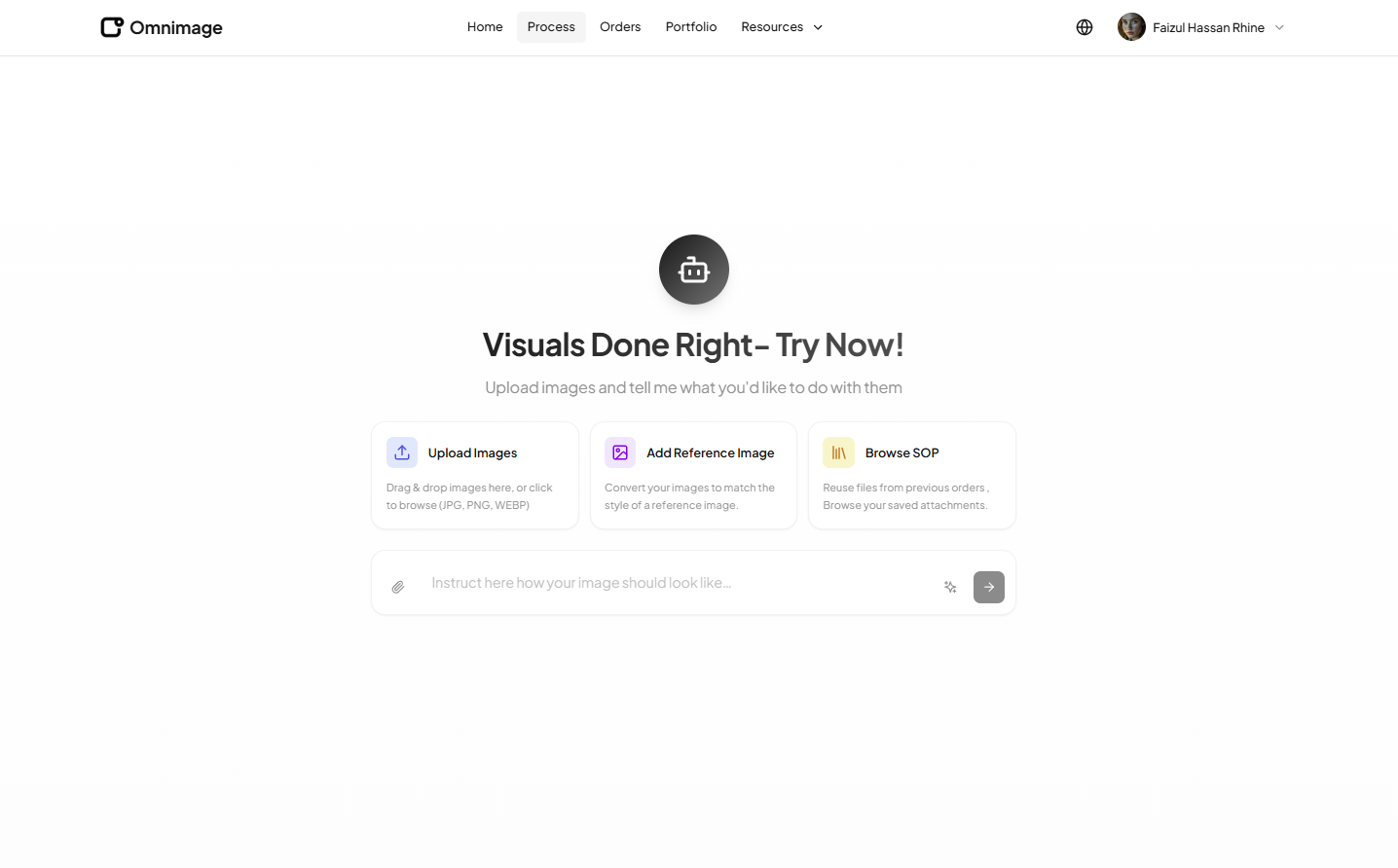
An advanced AI-powered image processing web application that provides comprehensive image editing, enhancement, and manipulation tools. Built with Next.js, featuring real-time processing, multiple AI models integration, and an intuitive user interface.
Project Overview
Omnimage is a cutting-edge AI-powered image processing web application that leverages advanced machine learning models to provide users with professional-grade image editing and enhancement capabilities. As a frontend developer, I built a modern Next.js application that integrates multiple AI services for various image processing tasks including background removal, object detection, image enhancement, style transfer, and more. The application features a clean, intuitive user interface that makes complex AI-powered image processing accessible to both professional designers and casual users. With real-time processing capabilities, batch operations, and comprehensive editing tools, Omnimage delivers a seamless experience for transforming and enhancing images using artificial intelligence.
Objective
The primary objective was to create a comprehensive AI-powered image processing web application that provides users with access to multiple AI models for various image manipulation tasks. The application needed to support real-time image processing, batch operations, multiple file format support, and an intuitive user interface that simplifies complex AI operations. Key requirements included integrating multiple AI services through REST APIs, implementing efficient file upload and processing workflows, creating a responsive and performant Next.js frontend, and ensuring fast processing times with real-time feedback. The goal was to deliver a professional-grade image processing tool that rivals desktop applications while being accessible through a web browser.
Approach
I architected the application using Next.js with server-side rendering and API routes for optimal performance. The frontend is built with React components that provide a seamless user experience for uploading, processing, and downloading images. I integrated multiple AI processing services through REST API endpoints, each handling different image processing tasks. The application features a modular architecture where different AI tools (background removal, enhancement, style transfer, etc.) are organized into distinct sections with specialized interfaces. I implemented real-time processing status updates using WebSockets and polling mechanisms to keep users informed during AI processing. The UI is designed with a focus on simplicity and efficiency, featuring drag-and-drop uploads, before/after previews, and batch processing capabilities. I also implemented comprehensive error handling, retry logic, and user feedback systems to ensure a reliable experience.
Deliverables
AI Image Processing Tools
Comprehensive suite of AI-powered image processing capabilities
- Background removal and replacement
- Object detection and segmentation
- Image enhancement and upscaling
- Style transfer and artistic filters
- Color correction and adjustment
- Noise reduction and sharpening
Real-Time Processing System
Fast, responsive image processing with live updates
- Real-time processing status updates
- Progress tracking for long operations
- WebSocket integration for live feedback
- Queue management for batch processing
- Processing history and results storage
- Instant preview of processed images
File Management System
Comprehensive file upload, processing, and download workflow
- Drag-and-drop file upload interface
- Multiple file format support (JPG, PNG, WEBP, etc.)
- Batch file processing capabilities
- File preview before and after processing
- Download processed images in multiple formats
- File organization and history management
User Interface & Experience
Intuitive, modern interface for image processing
- Clean, responsive design for all devices
- Tool-specific interfaces for each AI feature
- Before/after comparison views
- Interactive image editing controls
- Real-time preview of changes
- Helpful tooltips and user guidance
REST API Integration
Seamless integration with multiple AI processing services
- Multiple AI service API integrations
- Unified API client with error handling
- Request queuing and retry logic
- Rate limiting and optimization
- Response caching for improved performance
- Comprehensive error handling and user feedback
Performance Optimization
Fast, efficient image processing and delivery
- Image compression and optimization
- Lazy loading for large images
- Progressive image loading
- CDN integration for fast delivery
- Caching strategies for processed images
- Optimized bundle sizes and code splitting
User Account & History
User management and processing history tracking
- User registration and authentication
- Processing history and saved results
- Account settings and preferences
- Usage statistics and limits
- Favorite tools and presets
- Export and sharing capabilities
Technical Breakdown
Next.js Application Architecture
Built a production-ready Next.js application with optimized routing, server-side rendering, and efficient image handling.
Implemented Next.js App Router for modern routing structure
Created dedicated pages for each AI processing tool
Set up server-side rendering for improved SEO and performance
Implemented API routes for backend communication
Optimized page load times and image delivery
Configured dynamic metadata for each tool page
Implemented code splitting for optimal bundle sizes
AI Service Integration
Integrated multiple AI processing services through REST APIs for various image manipulation tasks.
Integrated background removal AI service
Connected object detection and segmentation APIs
Implemented image enhancement and upscaling services
Integrated style transfer and artistic filter APIs
Connected color correction and adjustment services
Implemented noise reduction and sharpening APIs
Created unified API client for all AI services
Real-Time Processing & Status Updates
Implemented real-time processing status updates and progress tracking for long-running AI operations.
Created WebSocket integration for live updates
Implemented polling mechanism for status checks
Built progress tracking UI components
Developed queue management system for batch processing
Created processing history and results storage
Implemented instant preview of processed images
Built notification system for completed processing
File Upload & Processing Workflow
Developed a comprehensive file upload system with validation, processing, and download capabilities.
Created drag-and-drop upload interface with progress tracking
Implemented file validation (type, size, format checking)
Set up file preview before processing
Integrated with AI processing API endpoints
Built batch file processing capabilities
Created download system for processed images
Implemented file format conversion and optimization
Image Preview & Comparison System
Built an interactive image preview system with before/after comparison capabilities.
Created before/after split view component
Implemented interactive image comparison slider
Built real-time preview of processing results
Developed zoom and pan functionality for images
Created image overlay and annotation tools
Implemented side-by-side comparison view
Built responsive image viewer for all screen sizes
User Interface Components
Developed reusable, intuitive UI components for the image processing workflow.
Created tool-specific interface components
Built interactive editing controls
Developed real-time preview components
Created file upload and management UI
Built processing status and progress indicators
Implemented responsive navigation and layout
Created help system with tooltips and guides
Performance Optimization & Caching
Implemented comprehensive performance optimizations for fast image processing and delivery.
Created image compression and optimization pipeline
Implemented lazy loading for large images
Built progressive image loading system
Integrated CDN for fast image delivery
Implemented caching strategies for processed images
Optimized bundle sizes with code splitting
Created efficient image format conversion
User Authentication & Account Management
Implemented user authentication and account management for processing history and preferences.
Built user registration and login system
Implemented JWT token-based authentication
Created processing history tracking
Developed account settings and preferences
Built usage statistics and limits tracking
Implemented favorite tools and presets storage
Created export and sharing capabilities
Error Handling & Reliability
Implemented comprehensive error handling and retry logic for reliable AI processing operations.
Created comprehensive error handling system
Implemented retry logic for failed API requests
Built user-friendly error messages and feedback
Developed fallback mechanisms for service failures
Created monitoring and logging system
Implemented rate limiting and request queuing
Built timeout handling for long operations
Key Technical Challenges & Learnings
Multiple AI Service Integration — Unified API Client
Integrating multiple AI services with different API structures, response formats, and error handling required creating a unified interface that abstracts complexity while maintaining flexibility for service-specific features.
I created a modular API client architecture with a base service class that handles common operations (authentication, error handling, retries) and specific service implementations for each AI provider. I implemented adapter patterns to normalize different API responses into a consistent format. I also created a service registry that allows easy addition of new AI services and built comprehensive error handling that provides service-specific error messages to users.
Real-Time Processing Updates — Long-Running Operations
AI image processing can take significant time, especially for high-resolution images or complex operations. Providing real-time feedback without blocking the UI or overwhelming the server was challenging.
I implemented a hybrid approach using WebSockets for real-time updates when available, with polling as a fallback. I created a processing queue system that manages multiple requests efficiently. I built progress estimation algorithms based on image size and operation type. I also implemented optimistic UI updates and background processing so users can continue working while operations complete. For very long operations, I added email notifications for completion.
Large File Handling & Performance
Handling large image files (high-resolution photos, multiple images in batch) required efficient upload, processing, and delivery without causing performance issues or timeouts.
I implemented chunked file uploads for large files, breaking them into smaller pieces for reliable transmission. I created client-side image compression before upload to reduce file sizes. I implemented progressive image loading and lazy loading for the UI. I also added file size limits with clear user feedback and optimized the processing pipeline to handle large files efficiently. I used CDN for fast image delivery and implemented caching strategies.
Before/After Preview & Comparison
Creating an intuitive before/after comparison interface that works well on all devices and screen sizes, with smooth interactions and accurate image alignment, was technically challenging.
I built a custom image comparison component using Canvas API for precise control. I implemented responsive design that adapts to different screen sizes. I created touch-friendly controls for mobile devices and smooth animations for desktop. I also added zoom and pan functionality for detailed comparison. I optimized image rendering to ensure smooth performance even with high-resolution images.
Error Handling Across Multiple Services
Different AI services have different error formats, rate limits, and failure modes. Creating a unified error handling system that provides helpful feedback to users while managing service-specific issues was complex.
I created a comprehensive error handling system with error categorization (network errors, API errors, processing errors, validation errors). I implemented service-specific error mappers that translate technical errors into user-friendly messages. I built retry logic with exponential backoff for transient failures. I also created fallback mechanisms where if one service fails, the system can suggest alternative services or operations. I added comprehensive logging for debugging while keeping user-facing messages simple and actionable.
Performance Optimization for Image Processing
Ensuring fast page loads, quick image processing, and responsive UI while handling large images and multiple concurrent operations required careful optimization.
I implemented multiple optimization strategies: image compression before upload, lazy loading for images in galleries, code splitting for different tool sections, CDN integration for fast image delivery, and caching of processed results. I optimized bundle sizes and implemented tree shaking. I also created efficient image format conversion (serving WebP when supported) and implemented progressive image loading. I used React.memo and useMemo strategically to prevent unnecessary re-renders.
User Experience for Complex AI Operations
Making complex AI image processing operations accessible and understandable to users with varying technical knowledge required careful UI/UX design and clear communication.
I designed an intuitive interface with clear visual hierarchy and tool organization. I created helpful tooltips and inline help text that explains what each tool does. I implemented preview functionality so users can see results before committing. I added preset options for common use cases to simplify complex operations. I also created a guided workflow for first-time users and built clear feedback systems that explain what's happening during processing. I ensured error messages are actionable and helpful rather than technical.
Outcome
Successfully delivered a comprehensive AI-powered image processing web application that provides users with access to multiple AI models for various image manipulation tasks. The application features real-time processing capabilities, intuitive user interface, and seamless integration with multiple AI services. The project was completed in 5 months, demonstrating proficiency in Next.js development, AI service integration, real-time processing systems, file handling, and building complex web applications. The application provides professional-grade image processing capabilities accessible through a web browser, making advanced AI image manipulation available to a wide range of users. The application is now live at omnimage.ai, serving users with reliable, fast, and intuitive AI-powered image processing.